Field Report · Tech Stacks
I Replaced Notion and Granola With a $0 App on Cloudflare
Possessions, places, contacts, expenses, meeting notes and a calendar you can type at in plain English, all behind a one-time login code. Here is how it is built, why the free tier covers it, and what the same jobs cost as subscriptions.

In April I shared my screen on a team call and opened an app nobody else on the call had seen. It asked for my email, then sent me a one-time login code. "I've created a gateway so it doesn't let anyone except me or my wife actually access this," I told them. Behind that gate was the app that had replaced Notion for both of us, and Granola for me.
Then I got to what I called the coolest thing about it. "It costs me zero dollars per month. It's all on Cloudflare."
A week later I was catching up with a friend and put it more bluntly: "I've de-Dropboxed and de-Google-Drived myself." My wife and I have our own Cloudflare D1 databases now, and I'd "de-Granola'd" myself too. When a meeting ends, the notes go "to my own D1, on my own database."
On that first call I said the story of moving off a subscription like Granola was "a whole blog right there." This is that blog. It's also the first post in a new series about what I build on Cloudflare.
What's inside
Here's what I clicked through on that call, in the order I showed it:
- Possessions. "That's everything we own in a single database."
- Places. "I'm creating our own version of essentially Google Maps," with each place marked visited, not visited or wish list.
- Meeting notes. Right after a meeting, the notes land in the app with the summary, my extra notes and the raw transcript. "So I don't need Granola for that anymore."
- A CRM for the people in our lives, which we were still building out.
- A calendar you can type at. I typed "work from hotel, 10 AM to 1 PM," and it went onto our daily calendar.
- Expenses. A running log of what we spend.
Most of it came out of Notion. My wife and I had been using Notion together, and "I used the MCP to port over everything." Notion's MCP server lets an AI tool like Claude read a Notion workspace, so the AI could carry our pages across into the new database. This has been my vibe coding project, which means I described what I wanted and Claude wrote the code.
How it's built
The app is small. The hosting, the database, the file storage and the login gate are all Cloudflare products with a free tier.
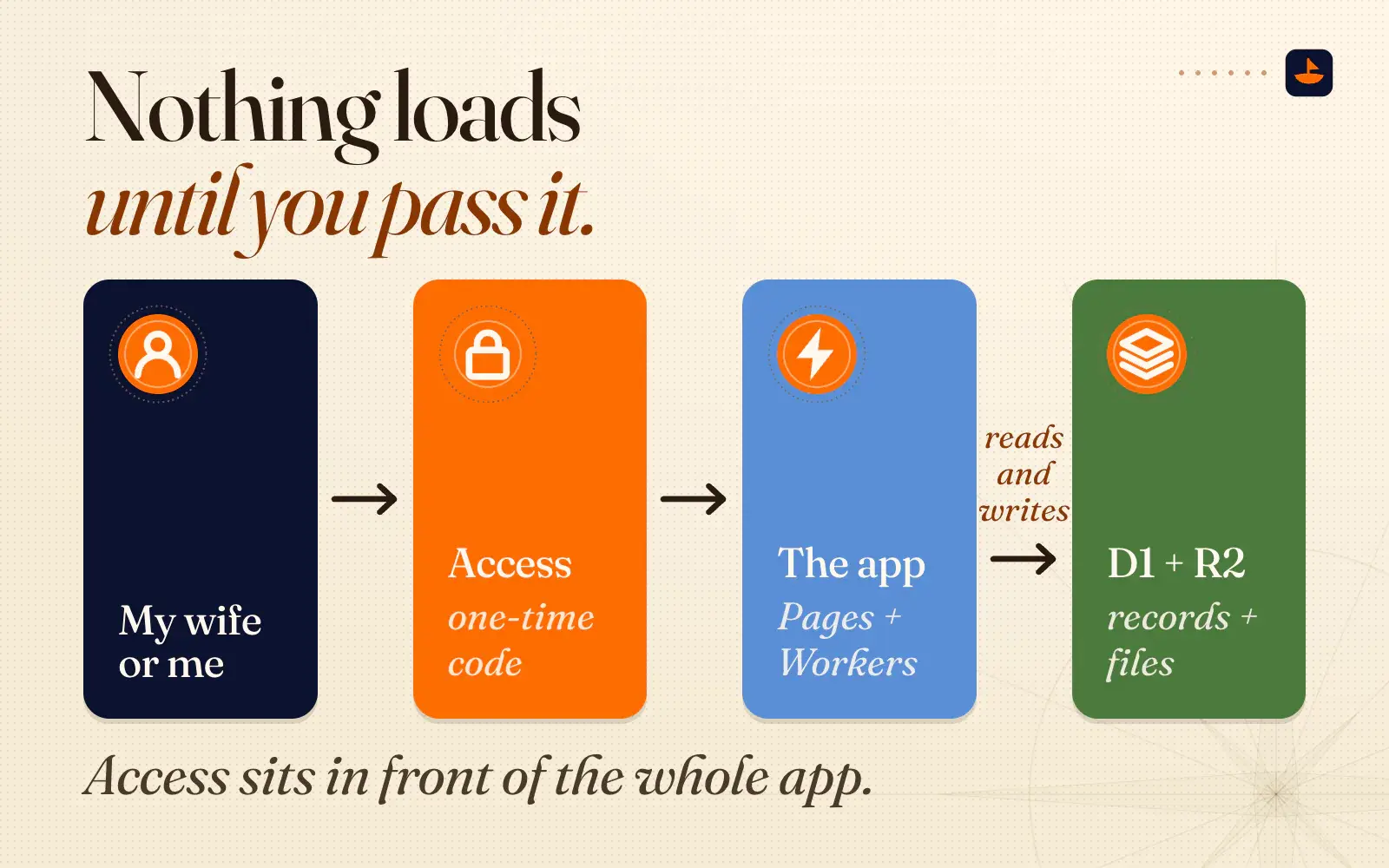
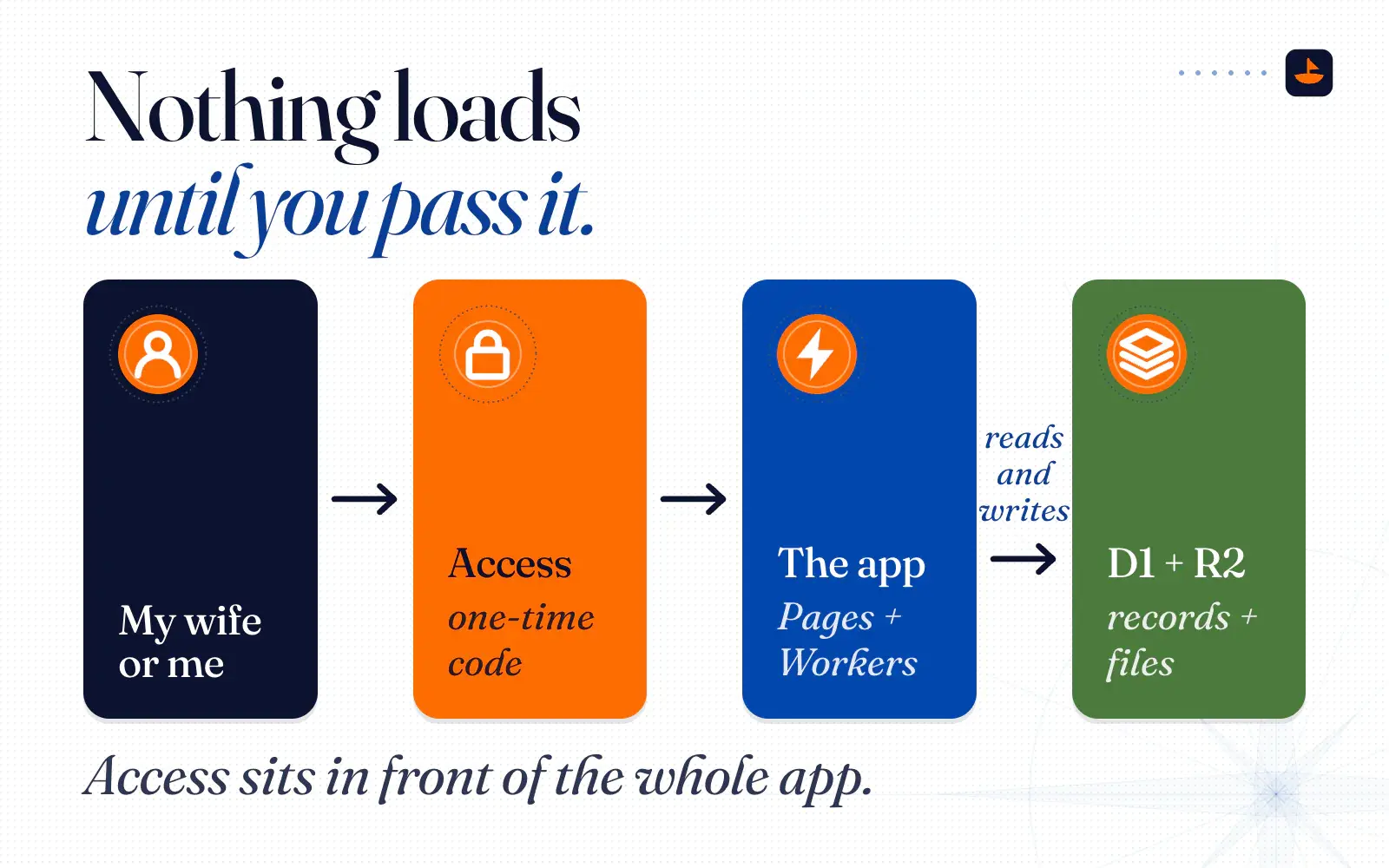
- The gate is Cloudflare Access. Access is part of Cloudflare's Zero Trust product, and here's how I explained the name on the call: "It means you give zero trust to the internet and you only trust people who deserve access to it." Access sits in front of the whole app. It only lets in our email addresses, and it proves you own the address by emailing you a one-time code. Nothing loads until you pass it.
- The app runs on Cloudflare Pages. It's built with Astro, the same framework this site runs on (here's why I use it). Pages serves the static files and runs the server code as Workers. A Worker is a small program that runs on Cloudflare's network instead of on a computer you own.
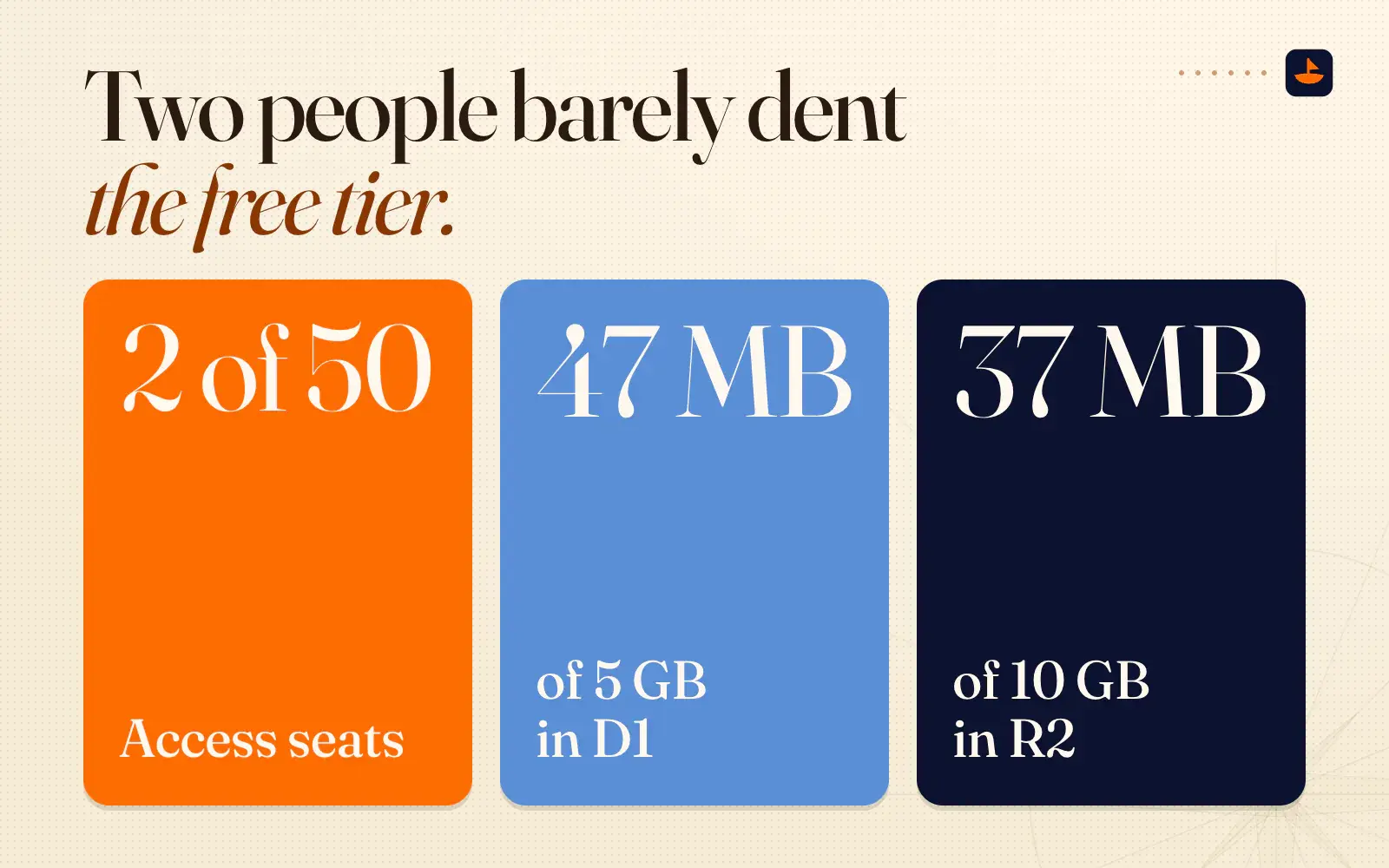
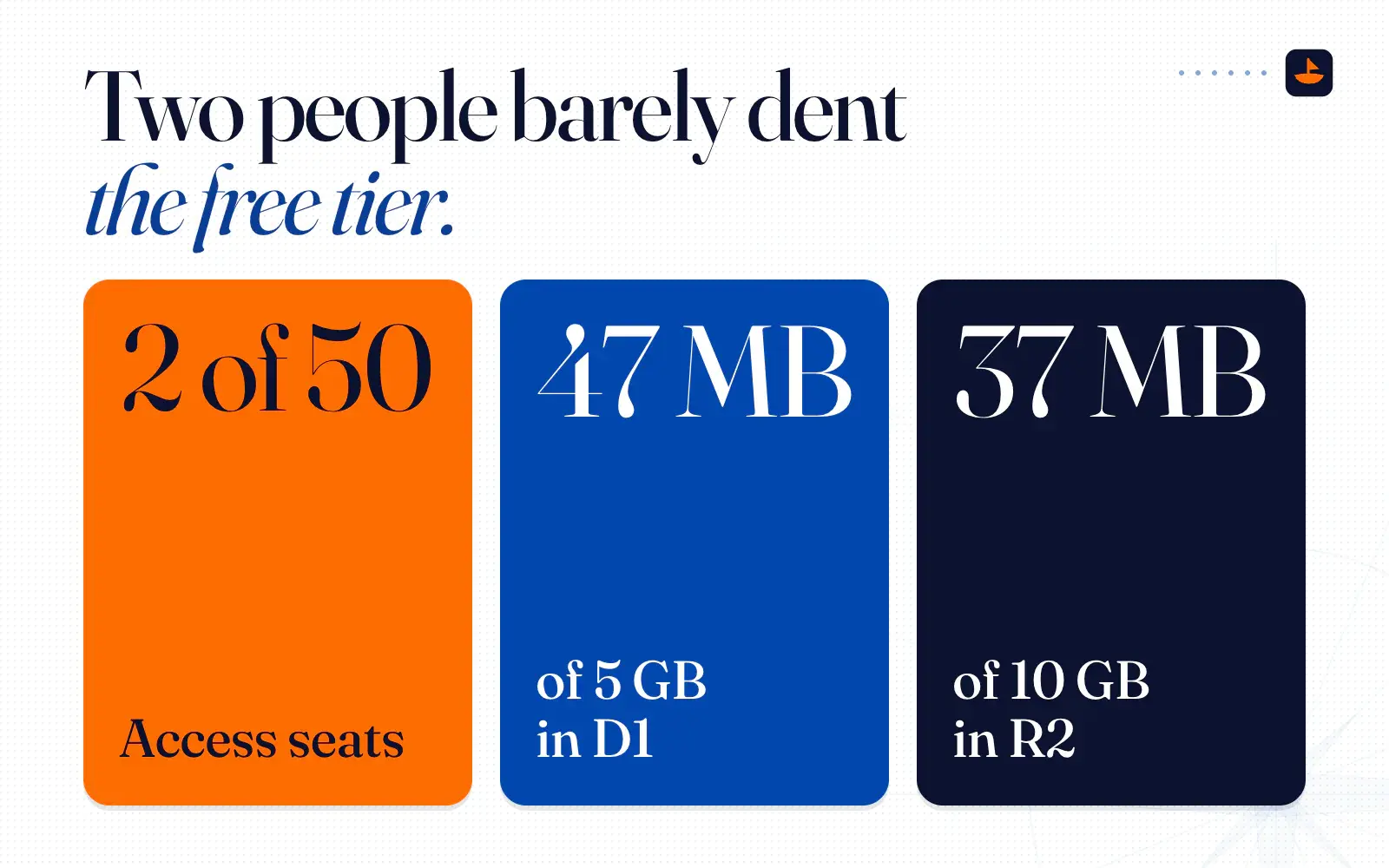
- The records live in D1, Cloudflare's SQL database. Every possession, place, contact, expense and meeting is a row. In April it held 43 tables and came to about 47 MB.
- The files live in R2, Cloudflare's file storage. The name, size and owner of each photo or PDF sit in D1, and the file itself sits in R2. In April that was about 37 MB of files.
So a visit goes from my wife or me, through Access and its one-time code, to the app, which reads and writes D1 and R2.
Meeting notes without Granola
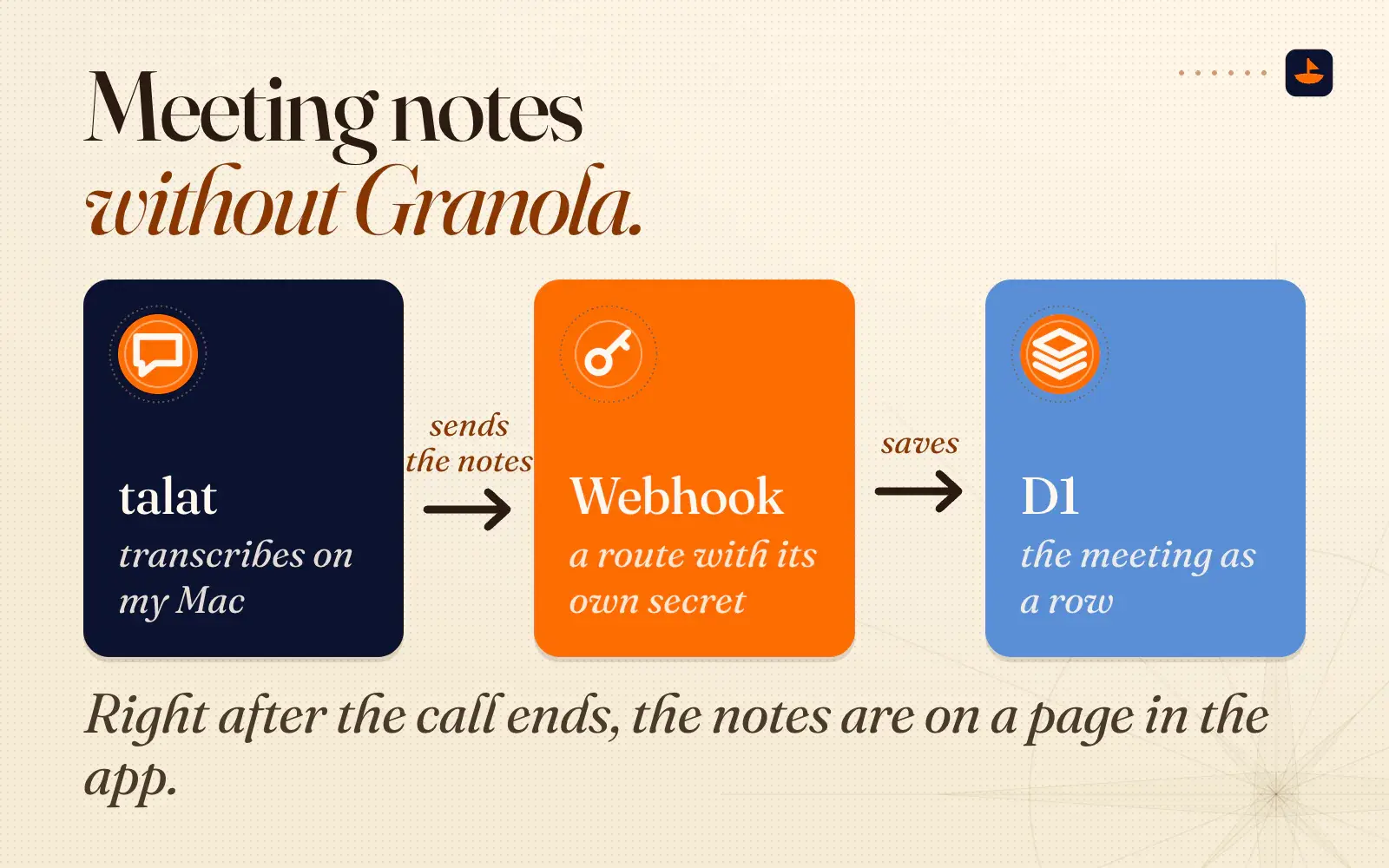
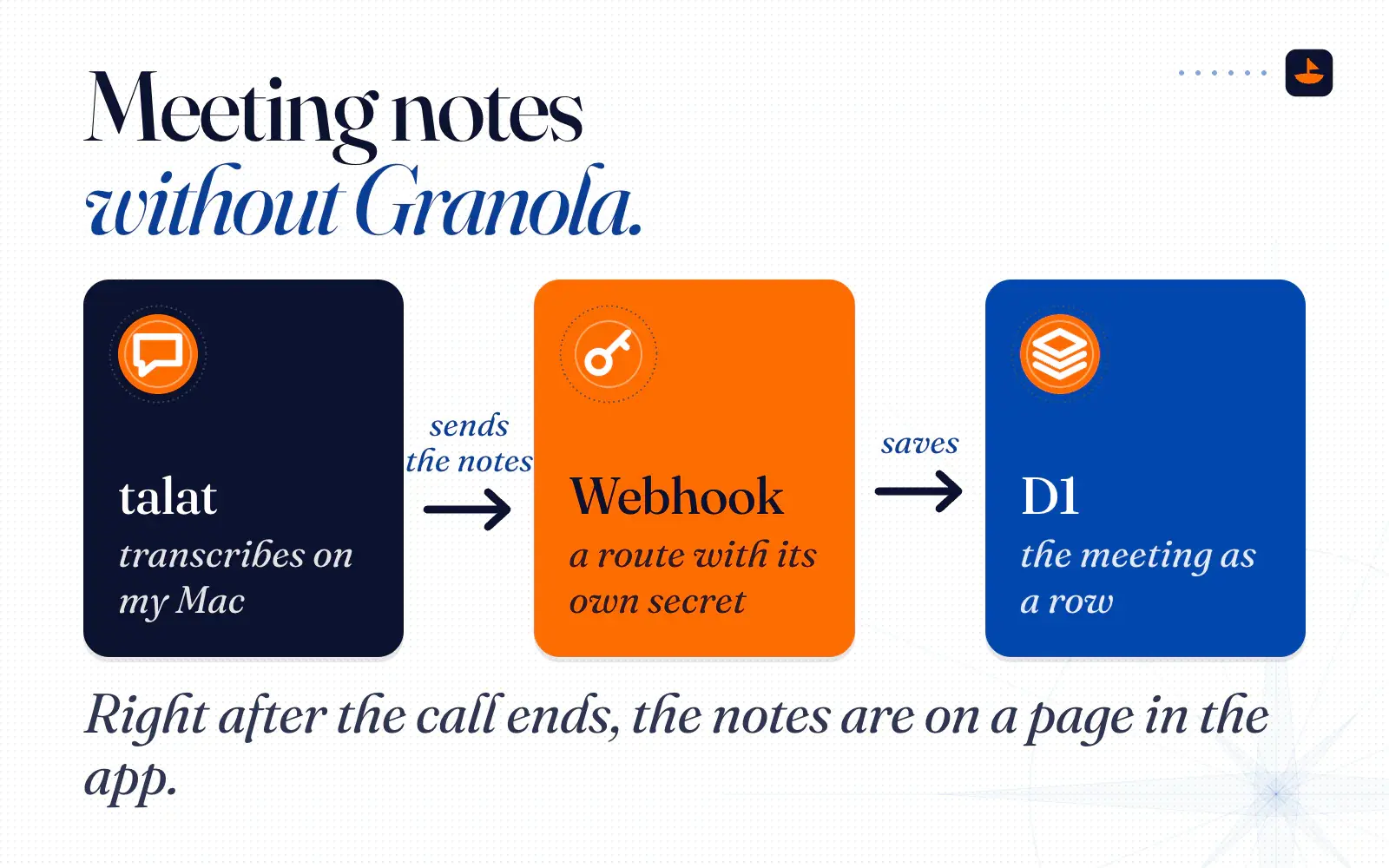
The meeting notes are the part that replaced Granola. I record meetings with talat, an app that transcribes on my Mac. When I switched in April I said "it costs $50 one time" and that "it's basically a local version of Granola." Its site now lists $89 a year or $189 for a lifetime license.
When a recording finishes, talat sends the notes to a webhook, which is just a web address that accepts incoming data. In my app that address is a route with its own secret. The app reads the title, date, people, summary and transcript, and saves the meeting as a row in D1. Right after the call ends, the notes are on a page in the app.
A calendar you type at
"You know how apps make a big deal out of having NLP, where you can just type in generic information and it can figure out the data from there," I said on the call. I wanted that too, so the app has one quick-add box for everything.
Calendar entries go to Chrono first. Chrono is a free, open-source date parser that runs right in the browser, so "work from hotel, 10 AM to 1 PM" becomes a calendar entry from 10:00 to 13:00 without any server call at all. Everything else, like an expense or a new place, goes to Claude Haiku, which decides which table it belongs in and fills in the fields. Either way the app shows me a preview, and nothing saves until I confirm it.
That Claude call is the one part of the app that isn't free. Anthropic bills it, not Cloudflare, at $1 per million input tokens and $5 per million output tokens for Haiku 4.5. A quick-add entry uses well under a thousand tokens, so each one costs a fraction of a cent.
Why it's $0
Here's what Cloudflare gives away on the free plan, checked in November 2026, next to what two people actually use.
- Workers and Pages: 100,000 requests a day, and requests for static files are free and unlimited. Even at a thousand requests a day, we'd use 1% of it.
- D1: 5 GB of storage, 5 million rows read and 100,000 rows written a day, and up to 500 MB per database. Our 47 MB is under 1% of the 5 GB, and under a tenth of the per-database cap.
- R2: 10 GB of storage a month, 1 million write-type operations and 10 million read-type operations a month, and no fee to download your own files. Our 37 MB is well inside it.
- Access: free for up to 50 users. We use 2 of the 50 seats.
Two people barely dent the free tier.
Free has edges, and it's worth knowing where they are. If a Worker on the free plan goes past 100,000 requests in a day, Cloudflare doesn't bill you. It returns an error until the count resets at midnight UTC. A D1 database can't grow past 500 MB, and D1's Time Travel, which can roll a database back to an earlier minute, only reaches back 7 days instead of the 30 on the paid plan. If we ever hit those walls, the next step is Workers Paid, which starts at a flat $5 a month. I make the longer case for flat pricing in Vercel vs Cloudflare.
Two costs sit outside Cloudflare, and I want to be straight about them. The talat license was a one-time purchase, and the Claude calls behind the quick-add box cost a fraction of a cent each. The app also lives on a subdomain of a domain I already had, so there was no new domain to buy.
What the same jobs cost as subscriptions
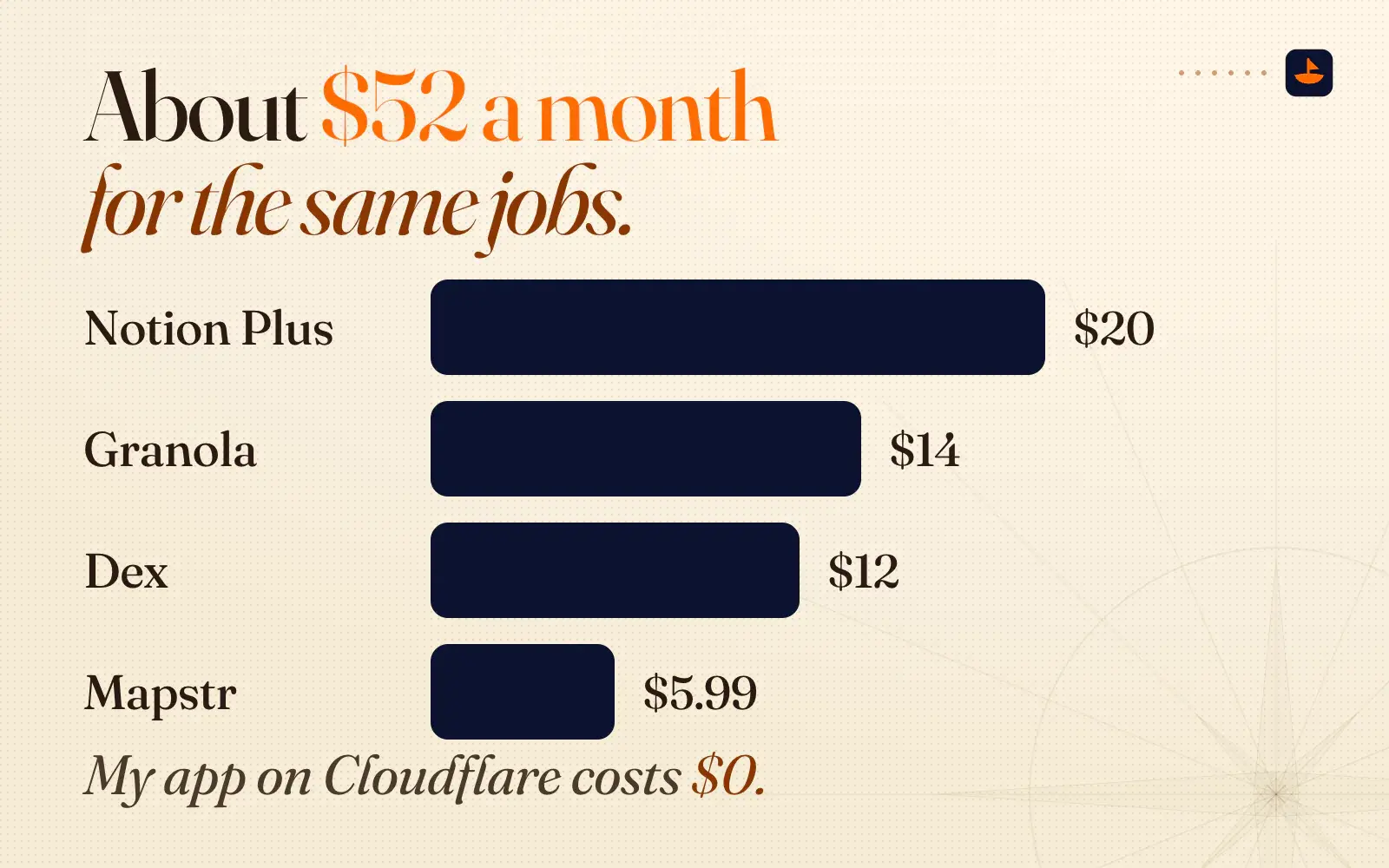
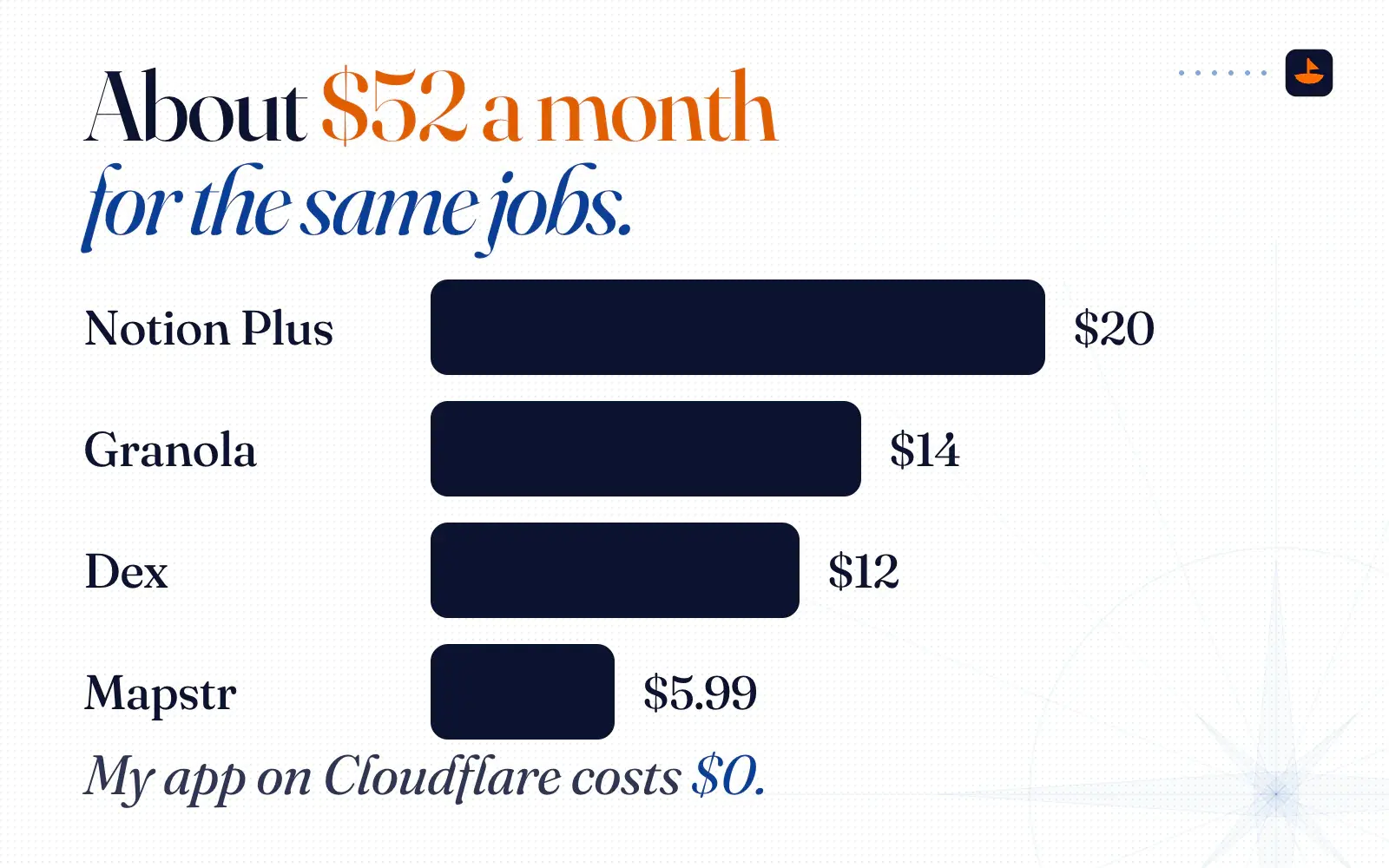
Notion and Granola are the two apps I actually replaced. To price the other jobs, I picked a well-known app for each one. Here are list prices in November 2026, for the two of us:
- Notion Plus: $10 per member a month, so $20 for both of us. Notion's AI meeting notes need the Business plan, which is $20 per member.
- Granola Business: $14 a month, for me.
- A personal CRM like Dex: $12 a month on the yearly Premium plan, or $20 month to month.
- A places app like Mapstr: Mapstr Plus starts at $5.99 a month on the US App Store.
That's about $52 a month for the same jobs, or roughly $624 a year. My app on Cloudflare costs $0.
The backup that doesn't need Cloudflare
Moving off Notion meant trusting Cloudflare with everything instead, so I built a way out. I have a portable SSD, and I had Claude write a script that runs locally on my computer when the drive is plugged in. It backs up the entire database. "The images, the information, everything." If Cloudflare decided to blow up tomorrow, I'd still have a physical copy of our most important information.
The script uses Wrangler, Cloudflare's command-line tool, to export the whole D1 database as a SQL file, plus one JSON file per table. Then it copies every file from R2 that isn't on the drive yet, and keeps the last 10 dated copies of the database. A SQL file can rebuild the database anywhere that runs SQLite, and JSON opens in almost anything.
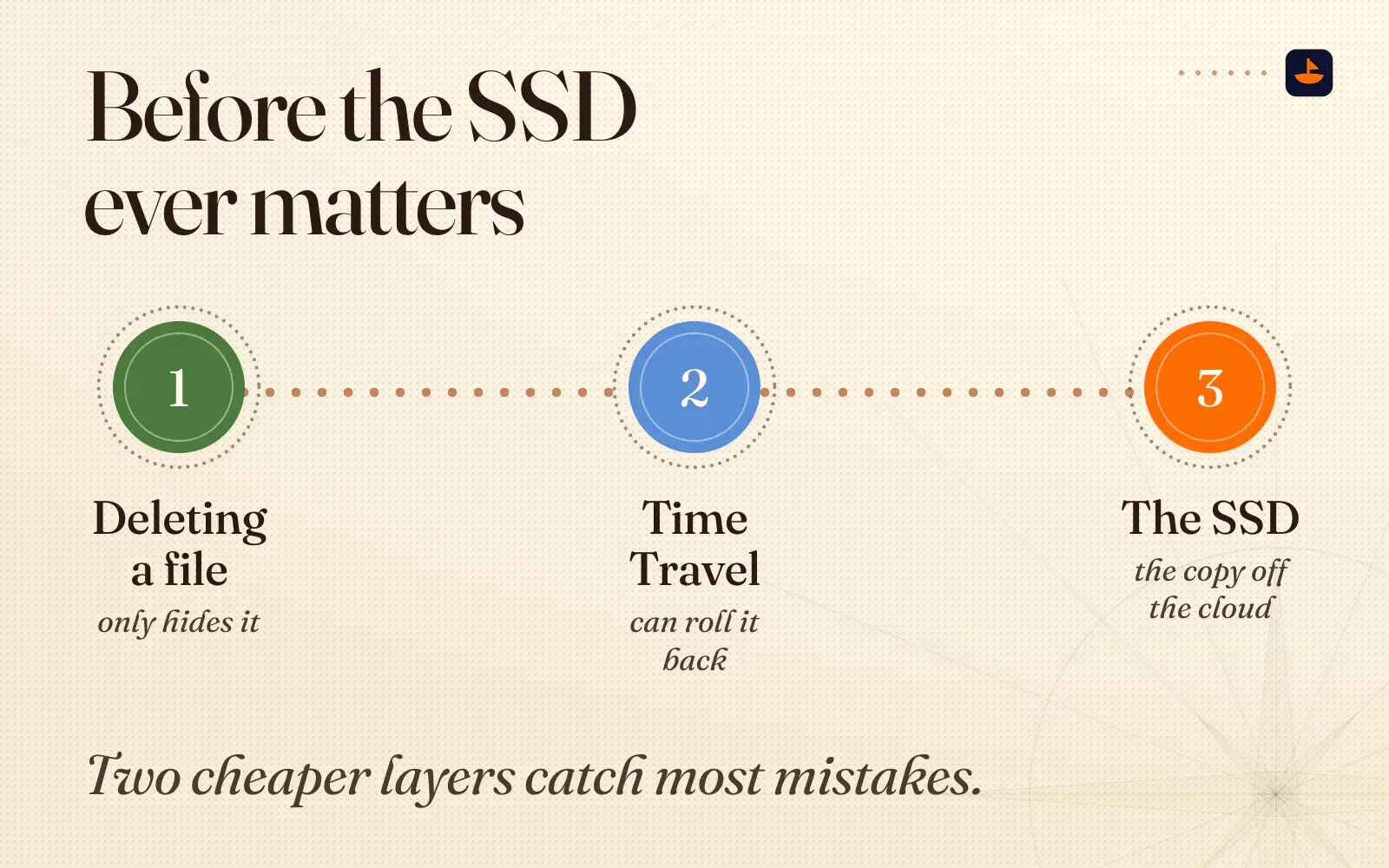
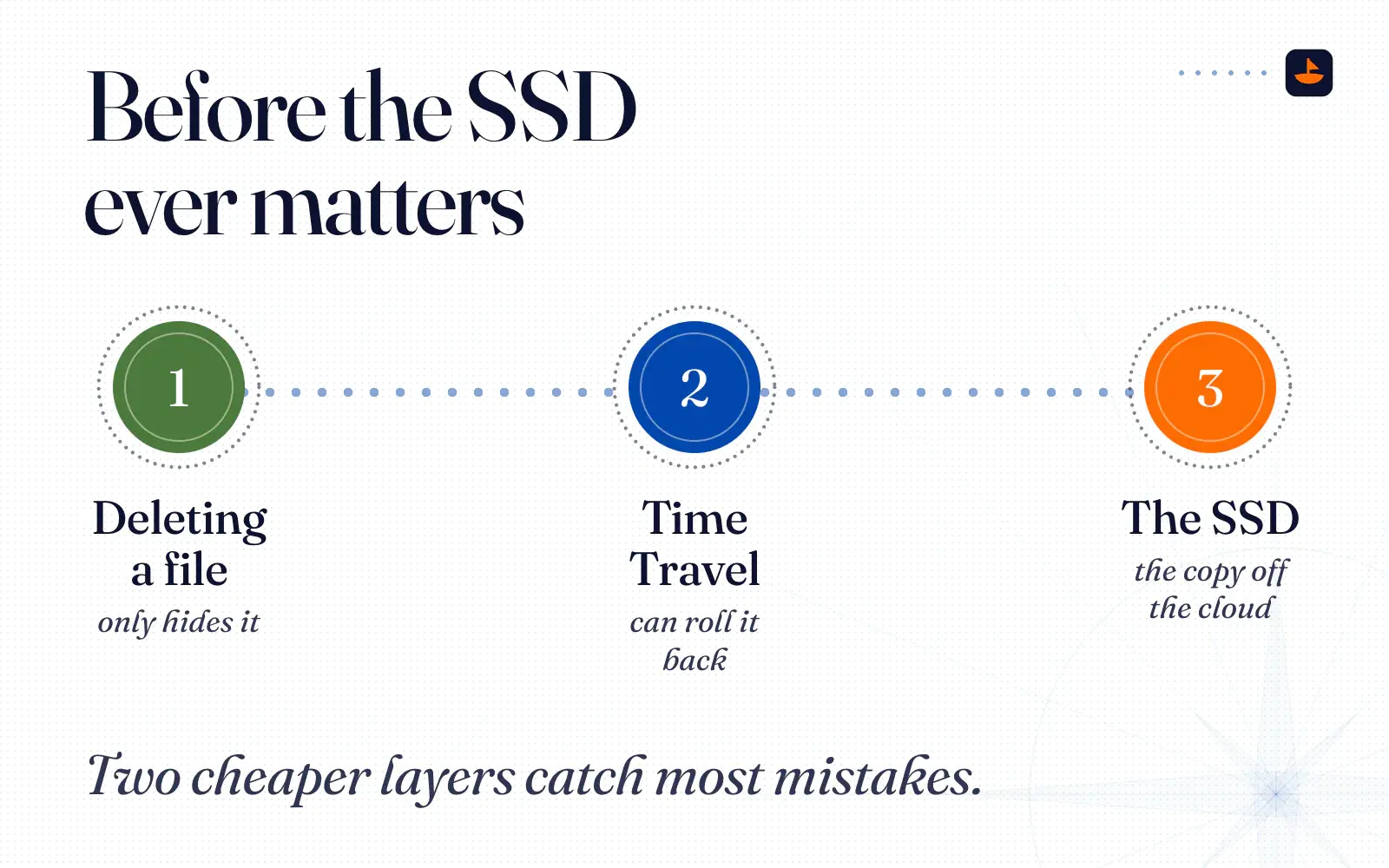
Before the SSD ever matters, two cheaper layers catch most mistakes. Deleting a file in the app only hides it, and I can bring it back within 30 days. D1's Time Travel can roll the whole database back to any minute in its window, which is 7 days on the free plan. The SSD is the copy off the cloud, for the day both of those are gone.
Why I put it all on Cloudflare
I didn't pick Cloudflare for this app alone. "I kept asking the AI to help me consolidate my risk, help me consolidate the moving parts," I told my friend. My sites, databases, file storage and contact forms all run there. "Everything's on Cloudflare. Everything."
This app shows what that looks like. One account holds the gate, the app, the database and the files, and one command-line tool deploys the app and backs it up. If you've never put anything on Cloudflare, How to Build and Publish a Website With AI walks through a first deploy for about $0 a month.
How to start your own
Here's the order I went in:
- Get your data out first. My advice on that call was to "talk to your Claude, get it to start exporting as much of your context, your meeting notes as possible. Build it into a CSV, build it into a markdown file, whatever you want."
- Put Access in front of it. Mine lets in our email addresses and sends a one-time code.
- Give it one database and one bucket. D1 holds the records and R2 holds the files.
- Keep a copy off the cloud. Mine is a script and a portable SSD.
Paste this into Claude Code or any AI coding tool and fill in the brackets:
I want to build a private app on Cloudflare for [who will use it].
It should replace [the apps I use now] and hold [the kinds of records, e.g. places, contacts, expenses].

Use:
- Cloudflare Access with email one-time codes, so only [these email addresses] can get in
- D1 for the records and R2 for files like photos and PDFs
- Only what fits inside Cloudflare's free plan

Before you write any code, give me a plain-English plan:
1. The tables and the pages
2. How I get my data out of [current app] and into D1
3. A script that backs up the whole database and every file to a local drive

Don't deploy anything until I approve the plan.
On that call I said a month from then I'd sound like the people who sell courses on running your life in Notion, except my line would be different: "Build your own application, never use another app ever again."
The short version
My wife and I keep our possessions, places, contacts, expenses and meeting notes in a private app on Cloudflare. Access keeps everyone else out with a one-time code, D1 holds the records, R2 holds the files, and a script copies all of it to an SSD. It replaced Notion and Granola. The same jobs would cost about $52 a month in subscriptions, and Cloudflare's free tier covers the hosting, so the bill is $0.
This is the first post in Built on Cloudflare, a series about what I build there. I post what I'm building on X @PalafoxPalmer.